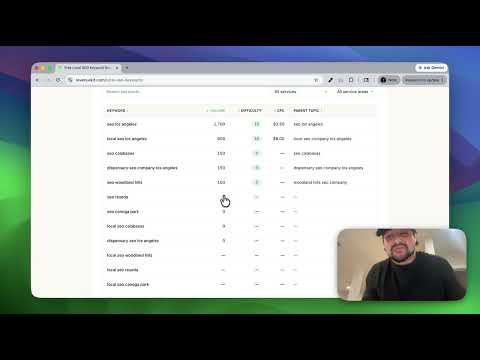
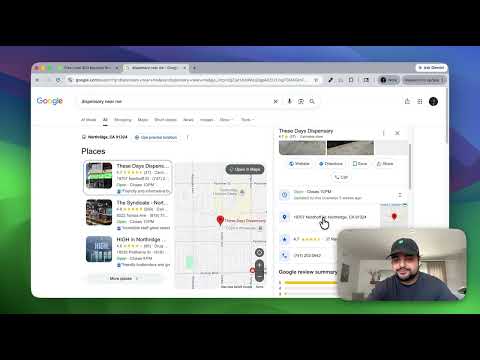
So, in today's video, I'm going to be teaching you guys how to do a little bit of recon on your competitors to see how their dispensary is ranking on Google. Of course, you could use the same strategy for your dispensary as well to see how you're ranking on Google in comparison to those competitors. But for today's example, since I don't have my own dispensary, I'm just going to use cookies. Uh they have a ton of different Google business profiles, but this one in particular looks pretty strong, right? Everything's filled out very well. They have a ton of questions that they're answering. They have a 4.6 star rating and over a thousand reviews, you know, almost 500 photos. Everything's pointing to the fact that they should be ranking pretty high, but we're actually going to get to the bottom of that in this video and see if that's the case or not. So, all you need to do to follow along is go to revenuekit.com.
I built this completely free tool. It's super easy to use and I'm going to walk you guys through how to use it right now as well. And just click on free SEO audit, right? That's how you get to this tool. So, we're going to start off with just searching for the business name, of course, uh, you know, cookies dispensary. And make sure the name matches the name of the Google business profile, right? So, this one is Cookies Brentwood. This one's Cookies Woodland Hills. Um, let me delete. So you'll see, you know, the autofill, you know, just select your business from the autofill and the first two keywords are going to be autogenerated for you. Dispensary near me is a very popular keyword. You always want to see how you're doing with that one. And then of course, dispensary and the city name of the business, right, of the dispensary. In this case, this cookies dispensary is located in Maywood, California, which is a city in Los Angeles. And then the third keyword, you could either leave it blank or if you want to, you know, get creative and see um, you know, whatever other keyword they might be ranking for, this would be the place to type it. So, we're going to do, if I could spell it properly, best dispensary Los Angeles, and click continue. In step two, it's just a confirmation. So, you know, this is the business and the keywords that we're going to be searching for. And then just fill out your information.
And click start audit. The software is going to do the rest. It's going to scan your Google business profile. It's going to scan each keyword and then it's going to give you a report for each scan. It just takes a minute or two. I think I'll just pause the video here and uh I'll see you guys in a minute when all the reports are ready. All right. And looks like we're good to go. So, we have three different reports for each keyword. Just need to click on them each to open up.
And let's go ahead and see what it says. So, this is a scan report for dispensary near me. And of course, here's the business that we're searching for. What this software does is it pretends to be a consumer in each one of these dots and it does a Google search for this keyword, right? So, it did in this case 25 Google searches uh in each spot for dispensary near me. And it basically gives you a report of where this business ranked in each of those locations. So, the very center is actually where the business itself is.
So, if somebody searches right by the business basically for dispensary near me, they're currently showing up number one. But you see the further away they get from the business it drops off very quickly. So 13 20 plus basically red is a bad sign. You don't want to be seeing red. You mainly want to be seeing green maybe some yellows. Right? So the higher up you are in ranking uh the greener the color will be. So in this case they're actually not ranking very well for dispensary near me. Let's see how they're doing for the other keywords.
This scan is for Dispensary Maywood. And right off the bat, huge difference, right? We're seeing greens, we're seeing yellows. Uh they're ranking number one, of course, right in their area. But even, you know, um you know, kind of to the to the left here. Uh you know, they're still coming out strong. Number two, number two, number one, number one, number two. But on the right side, for some reason, we're seeing some fours. We're seeing some sevens up here. So, still great, but of course some room for improvement.
And let's see the last one. Best dispensary Los Angeles. So, okay. You know, they they got some number ones, but of course, it's uh not as strong, right, as the uh dispensary Maywood uh keyword search. So, that's how they're doing for those keywords specifically in these areas specifically. Generally speaking, you want to see number ones, number tw's, and number threes. Why? Because that is what shows up at the top of the map pack. So, this is a map pack, right? If I search dispensary Maywood, I'm not near that area. So, of course, my results are going to be skewed. They don't actually show up in the top three.
But if you show up in the top three, there's a statistic that says 96% I believe or 93% of all clicks in the local SEO area go to the top three results. So if a user searches dispensary Maywood, 96% of them are going to click one of these top three, chances are they don't even click on more places to, you know, to sit and kind of scroll through the rest of the businesses. So, something to keep in mind while you're looking at the keywords um and the search results. But that's all I have for you guys in this video. If you guys want some help getting your map to look more green and yellow and get rid of those reds, feel free to get in touch. Uh leave a question below, comments, concerns, feedback, anything you got for me. Until next time, I'll see you guys later.
Peace.